Make-in-India OEM  •  Enterprise WiFi 6 · Switching · Security · AIOps Cloud
Home › Products
Product Portfolio

Enterprise Networking Products, Designed and Manufactured in India

Immunity Networks & Technologies Pvt Ltd is an Indian enterprise networking OEM. We were founded in 2009, our headquarters are at Powai in Mumbai and our manufacturing facility is at Sanand GIDC in Gujarat. This page is the index to the whole range: wireless access points, Layer 2 and Layer 3 switching, gateway and controller, optical transceivers, cloud management and the power and mounting accessories that hold an installation together. Each family below has its own page with the detail, and every one of those pages ends in the same place — a written confirmation of specifications for the exact model you intend to buy.

How the range fits together

One OEM from the edge port to the cloud dashboard

An enterprise network is not a shopping list of boxes. It is a path that a packet takes from a device in someone's hand, through a radio, into a switch port, across an uplink, past a policy engine and out to the internet — with something watching the whole route and telling you when it misbehaves. Our portfolio is organised along exactly that path.

Where each Immunity product family sits, from the edge to the core to the cloud A five-layer diagram. At the bottom sits the edge layer with NetWave Lotus Alpha indoor and outdoor access points, powered and mounted using PoE adapters and mounts. Above it sits the access layer with NetForce Layer 2 managed switches delivering Power over Ethernet and uplinks. Above that sits the distribution and core layer with NetForce Layer 3 switches, with NetBeam SFP and SFP plus transceivers carrying the fibre links between buildings. Above that sits the control layer with the NetGuard gateway and controller handling policy, segmentation and guest access. At the top sits NetCloud Central, the AIOps cloud management platform, giving visibility across every layer and every site. EDGE — NetWave WiFi: Lotus Alpha indoor & Lotus Alpha outdoor Ceiling, wall, pole and facade mounting · powered and fixed with PoE adapters and mounts ACCESS — NetForce Layer 2 managed switching Edge ports, VLAN separation, Power over Ethernet to the access points, uplinks northbound DISTRIBUTION & CORE — NetForce Layer 3 switching Inter-VLAN routing and aggregation · NetBeam SFP / SFP+ optics on the fibre between buildings CONTROL — NetGuard gateway and controller Policy, segmentation, guest onboarding, captive portal, bandwidth control at the boundary CLOUD — NetCloud Central (AIOps management) Provisioning, monitoring, alerting and multi-site reporting across every layer below one management plane

Read the diagram from the bottom upwards and you have the shape of the portfolio. At the edge, NetWave WiFi is the access point brand, with the Lotus Alpha family inside it in indoor and outdoor forms. Those access points are held up and powered by items from the PoE adapters and mounts range, which is unglamorous and which nobody thinks about until the day an installation is delayed because the bracket does not suit the ceiling. One layer up, NetForce switching provides the ports, with the Layer 2 managed range at the access edge and the Layer 3 range where routing and aggregation happen. Fibre between buildings and between distribution points runs on NetBeam SFP and SFP+ transceivers. The boundary and the policy layer is the NetGuard gateway and controller. Watching all of it is NetCloud Central, our AIOps cloud management platform.

The advantage of buying that path from a single Indian OEM is not a marketing point, it is an operational one. When the radio, the switch port, the optic, the policy engine and the dashboard all come from the same design house, the questions that normally consume weeks of a project — whether this optic will be recognised in that cage, whether that switch will deliver the power this access point wants, whether the controller can see the switch it is managing — have a single owner. And when something does go wrong at two in the morning, there is one number to call and no interval spent establishing whose problem it is.

Wireless

NetWave WiFi — access points for indoor and outdoor deployment

NetWave is the wireless brand. Lotus Alpha is the enterprise access point family inside it, split along the line that actually decides the hardware: whether the unit lives inside the building envelope or outside it.

NetWave WiFi

The access point family hub. Start here to understand how the Lotus Alpha range is structured, how the access points pair with switching, control and cloud management, and what to confirm in writing before a bill of materials is frozen.

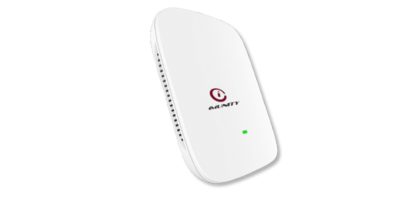
Lotus Alpha (indoor)

Indoor Wi-Fi 6 access points for ceiling, wall and above-false-ceiling mounting in offices, wards, classrooms, guest rooms, retail floors and back-of-house areas. Ask us to confirm current specifications in writing for the specific model.

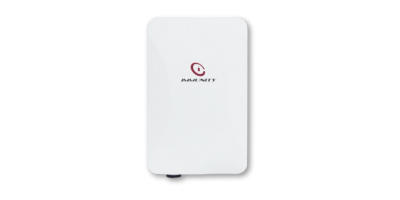
Lotus Alpha (outdoor)

Outdoor Wi-Fi 6 access points for pole, mast, parapet and facade mounting across yards, car parks, quadrangles, platforms and gate approaches. Confirm enclosure protection and operating range in writing for the specific model.

Most buyers arrive at wireless with a floor area and leave with a device count, and the gap between those two things is where wireless projects succeed or fail. A warehouse aisle and a lecture theatre of identical size need very different numbers of access points, because one is a distance-and-obstruction problem and the other is a concurrency problem. That is why the NetWave WiFi hub page spends more time on planning method than on hardware, and why we survey rather than assume for anything beyond a single small floor.

The practical division inside the family is straightforward. Lotus Alpha indoor units are designed around architectural constraints — crowded ceilings already carrying lighting, detectors, sprinklers and ducting; partitions of concrete, brick, glass and gypsum; and a physical footprint that a facilities manager will accept in a corridor or a patient room. Lotus Alpha outdoor units are designed around environmental ones — heat, monsoon, dust, coastal salt, long exposed cable routes, earthing and surge protection, and mounting points that were never intended to carry network equipment. Nearly every real site needs both, which is a good argument for designing them together rather than procuring them separately.

Wi-Fi 6 capability across the family matters most in busy buildings, where the gain is in behaviour under load rather than a headline figure measured on one laptop in an empty room. It does not repair a badly cabled building, an undersized uplink or an access point placed where the drawings allowed rather than where the users are. We do not publish throughput figures, radio configurations, client counts or ingress protection ratings on this page, because those vary by model and change over the life of a range. Ask us to confirm current specifications in writing for the specific model, and keep that confirmation in your tender file.

Switching

NetForce — Layer 2 and Layer 3 switching for the wired estate

Switching is the layer most often treated as a commodity and most often responsible, six months later, for the complaint that lands on the network manager's desk. NetForce is our managed switching family, split between the access edge and the routing layer above it.

NetForce Switches

The switching family hub. Where the Layer 2 and Layer 3 ranges sit relative to one another, how to decide which belongs at which point in a building, and how switching is specified alongside the access points it will power.

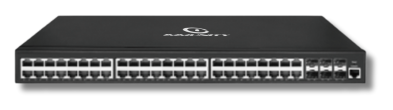
NetForce Layer 2

The managed Layer 2 range for the access edge: VLAN separation, quality of service, access control lists and Power over Ethernet to the access points, cameras and phones that sit on those ports.

NetForce Layer 3

The Layer 3 range for distribution and core: routing between segments, aggregation of access switches and fibre uplinks where the estate spans multiple buildings or floors.

The rule of thumb we use on a first call is simple. Keep segmentation and Power over Ethernet at the edge with the Layer 2 managed range, and move the routing decision as close to the traffic as the design sensibly allows with the Layer 3 range. A single-building office with a handful of VLANs may never need routing in the switch at all. A campus with several buildings, a data room in each and a fibre spine between them almost certainly does, because hairpinning every inter-segment flow back to one gateway is a design that works on the day of handover and stops working the first time somebody adds a video system.

The point that gets missed most often is the interaction between wireless and wired. Access points are specified with care, switching is bought on price, and the site later discovers that the ports cannot power a full complement of radios, or that the uplink cannot carry aggregate traffic at the busy hour. The NetForce hub page exists partly to force that conversation to happen while the bill of materials is still editable. We will not publish a power budget on a category page, because it varies by model and by combination — ask us to confirm current specifications in writing for the specific model and switch pairing you intend to buy.

Control, optics and cloud

NetGuard, NetBeam and NetCloud Central

Above the wired and wireless layers sit the three things that turn a collection of equipment into a network somebody can actually operate: a policy boundary, reliable optical links, and one place to see everything.

NetGuard gateway & controller

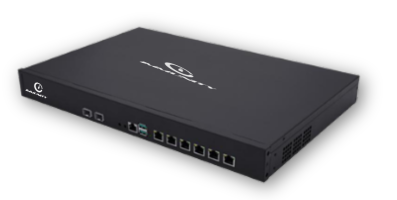
The policy and control layer: segmentation between corporate, guest, contractor and device traffic, guest onboarding and captive portal, bandwidth control, and a single place to make a change rather than touching every unit.

NetBeam optics

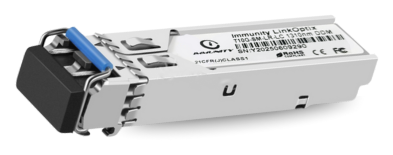
SFP and SFP+ transceivers for the fibre links between buildings, floors and distribution points — supplied and supported by the same OEM that made the switch the module is going into.

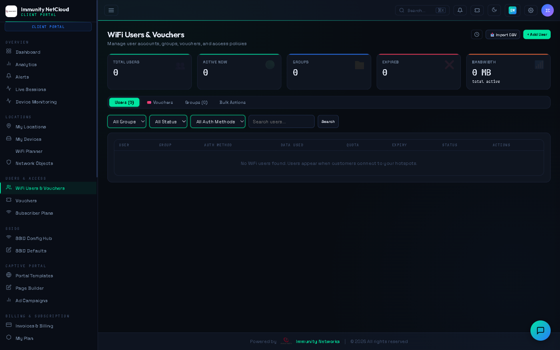
NetCloud Central

The AIOps cloud management platform: provisioning, live monitoring, alerting and multi-site reporting, so a complaint from a branch does not begin with an hour spent working out which access point the user was on.

The NetGuard gateway and controller is where the questions your security team asks get answered: which network segments can reach which, how a visitor gets online without touching corporate resources, how a contractor's laptop is treated differently from a finance workstation, and how any of that is changed across thirty branches without thirty separate logins. What topology suits a given estate depends on how many sites there are, how they are connected and what the organisation's own policy requires — which makes it a design conversation rather than a datasheet lookup.

NetBeam optics deserve more attention than they usually get. Transceiver compatibility, coding and diagnostics are a recurring source of avoidable site delay in multi-vendor builds, and the resolution frequently involves two suppliers explaining that the fault lies with the other. Buying the module and the switch from one OEM removes that argument entirely. As with everything else here, ask us to confirm current specifications in writing for the specific model — reach, wavelength, connector type and the switch platforms it is intended for.

NetCloud Central is the layer that decides whether your team spends its week operating the network or investigating it. Zero-touch provisioning matters when you are rolling out to many sites with local hands rather than travelling engineers. Live visibility matters when a user reports that "the Wi-Fi is slow" and you need to establish, within minutes and not hours, whether the problem is the radio, the uplink, the gateway or the application. Multi-site reporting matters when you have to justify next year's budget with something more persuasive than an anecdote.

PoE adapters & mounts

Power injectors, adapters and mounting hardware for clean, serviceable installations — indoor and outdoor. The part of the order that is easiest to forget and most likely to hold up a site visit when it is missing.

Solutions

The same products arranged by the problem they solve: campus wireless, switching and routing, network security, public Wi-Fi and captive portal deployments. Start here if you know the outcome but not the component list.

Industries

How the range is deployed in education, healthcare, hospitality, manufacturing, logistics, retail, government and rural connectivity — and what changes about the design in each of those environments.

The PoE adapters and mounts range is the least discussed and most frequently decisive part of a delivery. A bracket that does not suit a particular ceiling tile, an injector that arrives after the installation crew, an outdoor mount that was specified for a pole and turns up at a parapet — each of these costs a site visit, and site visits are the expensive part of any rollout. We would rather have that conversation at quotation stage than at handover.

If you would rather approach the portfolio from the other direction — by outcome rather than by product — the solutions pages group the same hardware around campus wireless, switching and routing, network security and public Wi-Fi, and the industries pages set out what changes in a hospital, a hotel, a plant, a warehouse, a college or a government office. Most enquiries reach us through one of those two routes rather than through a model number, which is entirely reasonable.

Why a single OEM

One OEM, or four vendors and a support matrix

Most Indian enterprise networks are assembled from several brands because that is how they grew, one refresh at a time. It works. It also creates a shape of ownership that only becomes visible under pressure.

Single-OEM stack compared with a multi-vendor stack A side-by-side comparison. On the left, a multi-vendor arrangement: four separate supplier boxes for access points, switching, gateway and management, each with its own support contract, its own warranty terms and its own escalation path, all converging on one network manager who has to establish which vendor owns a given fault. On the right, a single-OEM arrangement: one supplier box covering NetWave access points, NetForce switching, NetGuard control, NetBeam optics, PoE accessories and NetCloud Central management, with one support path, one warranty conversation and one escalation route to the same network manager. Multi-vendor stack Vendor A access points Vendor B switching + optics Vendor C gateway / security Vendor D management tool Your network manager owns the integration risk 4 support contracts · 4 warranty regimes 4 escalation paths · 4 firmware calendars Fault ownership established case by case Single OEM — Immunity One design house, one factory NetWave access points · NetForce L2 / L3 switching NetGuard control · NetBeam optics · PoE accessories NetCloud Central management across all of it Designed and manufactured in India Your network manager one owner for the whole path 1 support relationship · 1 warranty conversation 1 escalation path · domestic RMA route Fault ownership settled before the call begins

We are not going to pretend that a multi-vendor estate is unworkable, because plenty of well-run networks are exactly that. What we will say is that the costs of it are real and are almost never in the capital budget. They appear as engineer hours spent reproducing a fault to prove which supplier owns it, as a fibre link that stays down over a weekend while two vendors examine each other's diagnostics, as four firmware calendars that never align, and as a cross-border warranty replacement that takes six weeks on a part that failed in week ninety.

A single-OEM stack changes the arithmetic. The access point, the switch port beneath it, the optic in the uplink, the policy engine at the boundary and the dashboard above it are designed by the same organisation and tested together. When a site raises a ticket, no time is spent on attribution. And because the design house and the factory are both in India, a replacement part travels a domestic route rather than an international one. For an estate of any size, that difference in logistics is the one that shows up in your availability numbers.

Make in India

An Indian networking OEM, and what that means at procurement

We have been designing and building enterprise networking hardware in India since 2009. The head office is at Powai in Mumbai; the manufacturing facility is at Sanand GIDC in Gujarat.

For a growing number of buyers, domestic manufacture is not a sentiment but a procurement condition. Public sector and public-sector-adjacent tenders increasingly carry local content requirements and preference clauses for domestically manufactured electronic products. If your tender does, tell us at the enquiry stage and we will give your compliance officer the documentation they need rather than a brochure. The certifications page is where we keep that side of the conversation.

On approvals, our advice is deliberately even-handed and applies to us as much as to anyone else on your evaluation list. Indian buyers increasingly require networking equipment to carry MTCTE registration, TEC approvals and, where radio equipment is involved, WPC approvals. These are per-product rather than per-brand, they are time-bound, and they change as products and rules are revised. Ask every vendor to confirm in writing which approvals apply to the exact model and variant being quoted, dated at the point of quotation, and file that written answer. Do not treat a brand-level claim on any website, ours included, as evidence for a specific model.

Two roles are worth separating clearly, because they are frequently conflated and the difference is material at tender stage. With BSNL, Immunity is a Public Wi-Fi Partner — a partnership role with the operator. Separately, under the PM-WANI framework, Immunity is a certified PDO Aggregator (PDOA). Those are two different schemes with two different sets of obligations. Immunity is not a PDO. If your project touches either arrangement, raise it early and we will tell you which role is relevant to what you are building.

Buying route matters too. Many of our deployments reach site through systems integrators and regional resellers rather than directly, and the partners page explains how that works, what support the channel receives and how a project is handled when the integrator holds the customer relationship. Separately, if you are a brand looking to put your own name on certified networking hardware built in India, the OEM and ODM page covers private-label manufacture, the engagement model and what we need from you to start.

How to use this index

Three sensible ways in

If you know the product. Go straight to the family page — NetWave WiFi, NetForce switching, NetGuard, NetBeam optics, NetCloud Central or PoE adapters and mounts — and then ask us to confirm current specifications in writing for the specific model before you raise a purchase order.

If you know the outcome but not the product. Start at solutions or industries, describe the site, and let the component list fall out of the design rather than the other way round. This is how most well-run projects begin.

If you are building a tender or a bill of materials. Bring us in while the document is still editable. Send drawings, an occupancy plan, or simply a description of the sites, users and applications. We will tell you what we would deploy and why, say plainly whether a survey is needed, and confirm what we can and cannot evidence in writing. If your existing infrastructure can carry the design, we will say that too — a specification is more useful than a sales pitch, and it is what your file needs.

Get a specification for your sites, not a generic one

Tell us how many sites you have, what happens in them, how many people and devices are on them and what is being replaced. Our India-based engineers will come back with a recommended stack across access points, switching, control, optics and cloud management — and with written confirmation of specifications for every model quoted.

FAQ

Questions we are asked about the product range

What does Immunity Networks actually manufacture?

Enterprise networking hardware and the software that manages it: NetWave WiFi access points in indoor and outdoor forms, NetForce Layer 2 and Layer 3 switching, the NetGuard gateway and controller, NetBeam SFP and SFP+ transceivers, PoE adapters and mounting hardware, and NetCloud Central, our AIOps cloud management platform. Design and manufacture are in India, with the factory at Sanand GIDC in Gujarat and the head office at Powai in Mumbai.

Where do I find port counts, throughput figures and client capacities?

Not on this page, and deliberately so. Those figures differ by model and change over the life of a range, and a specification lifted from a web page eighteen months ago causes more procurement disputes than it prevents. Ask us to confirm current specifications in writing for the specific model you intend to purchase, and keep that written confirmation with your tender or purchase file. We would give the same advice about any vendor you are evaluating.

Do I have to buy the whole stack, or can I take one product family?

You can take one family. Plenty of customers begin with Lotus Alpha indoor access points on an existing switch estate, or with NetForce Layer 2 switching under access points from another brand. What we will do is tell you honestly where the interfaces sit and what the existing equipment has to provide — particularly around power delivery and uplink capacity — so that the boundary is understood before delivery rather than after it.

How do I choose between Layer 2 and Layer 3 switching?

Broadly, the Layer 2 managed range belongs at the access edge, where the job is VLAN separation, quality of service and Power over Ethernet to devices. The Layer 3 range belongs where routing and aggregation happen — typically distribution and core in a multi-building or multi-floor estate. A single-building office with few segments may not need routing in the switch at all. The NetForce hub page sets out the decision, and we will work through it against your actual topology.

What certifications does the equipment carry, and how do I verify them?

Indian buyers increasingly require MTCTE registration, TEC approvals and WPC approvals where radio equipment is involved. These are per-product and time-bound rather than brand-level and permanent. Our advice is to ask any vendor, ourselves included, to confirm in writing which approvals apply to the exact model and variant being quoted, at the time of quoting. See the certifications page and send us a written request naming your specific models.

What is Immunity's role in PM-WANI and with BSNL?

They are two separate roles and should not be conflated. With BSNL, Immunity is a Public Wi-Fi Partner, which is a partnership role with the operator. Separately, under the PM-WANI framework, Immunity is a certified PDO Aggregator (PDOA). Immunity is not a PDO. If your project involves either, tell us early, because getting the role wrong at tender stage causes avoidable delay. Outdoor deployments under such schemes usually involve the Lotus Alpha outdoor range alongside NetGuard and NetCloud Central.

📞 Request a Demo