Make-in-India OEM  •  Enterprise WiFi 6 · Switching · Security · AIOps Cloud
Home / Products / NetForce Switches / NetForce L2
NetForce L2 Series · Managed access-layer switching · Make in India

NetForce L2 — managed Layer 2 switches for the access layer

Three managed Layer 2 models — the compact 8-port PoE+ E822, the 24-port D822 and the 48-port D486 — designed and manufactured by Immunity Networks & Technologies at our Sanand GIDC plant in Gujarat, engineered from Powai, Mumbai, and managed from NetCloud Central. This page explains where each model fits, how to size PoE and uplinks, and how to choose between the three without over-buying.

Where this layer sits

The access layer is where your network meets reality

Every design conversation in an Indian enterprise network eventually arrives at the same picture: a set of core or distribution switches doing the routing, a set of access switches doing the connecting, and a security gateway sitting between the campus and the world. The NetForce L2 family lives firmly in the middle band — the access layer. These are the switches that terminate the copper going to desks, the copper going up to ceiling-mounted access points, the copper going out to camera poles, and the copper going into biometric readers, IP phones, printers, digital signage panels, PA amplifiers and access-control controllers.

That position matters because the access layer carries almost all of the operational pain in a campus. Ports go down. Cables get pulled. Somebody plugs a consumer router into a wall socket and starts handing out addresses. A camera contractor daisy-chains two patch cords and creates a loop. A department's traffic leaks into the guest network because a trunk was configured in a hurry. Almost none of these events happen at the core; nearly all of them happen at the edge. A managed Layer 2 switch is the tool that lets you contain them — with VLANs, with access control lists, with 802.1X port-based authentication, with IGMP snooping, and with the spanning-tree family (STP/RSTP/MSTP) doing loop prevention in the background.

The other reason the access layer deserves attention is power. In a modern campus, a large share of endpoints no longer have their own power supply. Access points, cameras and IP phones expect the switch to feed them. That makes the PoE budget on your access switch a genuine design constraint rather than a line item — and it is the single most common reason we see an Indian site under-specified. The NetForce L2 E822 exists precisely for the small PoE cluster; the NetForce L2 D486 exists for the floor or building distribution frame where forty-eight ports terminate in one rack.

Above the access layer, routing and inter-VLAN forwarding are handled by the NetForce L3 series. Below and around it sit NetWave Wi-Fi access points, the NetGuard controllers at the security edge, and NetBeam optics in the fibre uplinks. The family view of all of it is on the NetForce Switches hub.

Where NetForce L2 sits in a campus network A three-band diagram. The top band is the core and distribution layer occupied by NetForce L3 switches and the NetGuard security edge. The middle band, highlighted in maroon, is the access layer occupied by NetForce L2 E822, D822 and D486 switches. The bottom band shows the endpoints those access switches connect and power: Wi-Fi access points, IP cameras, IP phones, desktops and building systems. Core / distribution layer NetForce L3 — inter-VLAN routing, aggregation, 10G SFP+ fibre uplinks NetGuard controller at the internet / WAN edge Access layer — NetForce L2 E822 · 8-port PoE+ edge D822 · 24-port floor D486 · 48-port high density Endpoints — connected and powered Wi-Fi access points · IP cameras · IP phones · desktops · printers Access control · biometrics · signage · building management systems
Model comparison

The three NetForce L2 models at a glance

Every model in the series is a managed Layer 2 switch with VLAN, QoS, ACL and IGMP snooping, 802.1X with ARP inspection and DoS protection, the STP/RSTP/MSTP spanning-tree family, and management through NetCloud Central, web UI, CLI, SNMP and SSH. What separates them is port count, PoE and uplink configuration. Figures below are those already published on each model page; for anything not shown, ask us to confirm current specifications in writing for the specific model.

Compact eight-port switch icon

NetForce L2 E822

Where it fits: the compact PoE+ edge — a small cluster of access points, a camera pole, a shop-floor cabinet or a branch office where eight powered ports and a fibre pair are all that is required.

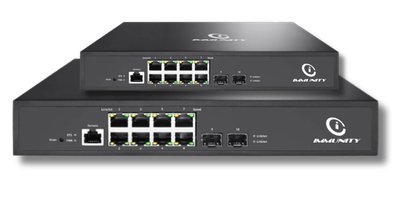
Published configuration: 8 × 10/100/1000 Gigabit PoE+ RJ45 access ports, 2 × SFP fibre uplinks, PoE+ (802.3at) on every port, VLAN, QoS, ACL and IGMP snooping, 802.1X with ARP inspection and DoS protection, STP/RSTP/MSTP, and desktop, wall or rack mounting.

View the NetForce L2 E822 →

Twenty-four port rack switch icon

NetForce L2 D822

Where it fits: the mid-density floor or branch switch — the middle rung between a single edge cabinet and a full 48-port distribution frame.

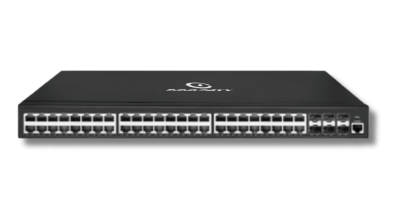
Published configuration: 24 × Gigabit access ports with fibre uplinks, positioned for offices, branches and mid-size campuses. Port-level PoE, uplink count and switching capacity vary by build, so ask us to confirm current specifications in writing for the specific model before you finalise a bill of materials or a tender response.
View the NetForce L2 D822 →

Forty-eight port high density switch icon

NetForce L2 D486

Where it fits: the high-density distribution frame — one rack unit terminating an entire floor, hostel block, ward wing or production hall.

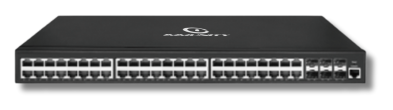
Published configuration: 48 × 10/100/1000 Gigabit RJ45 access ports, 4 × SFP/SFP+ fibre uplinks, wire-speed non-blocking switching, STP/RSTP/MSTP, VLAN, QoS, ACL and IGMP snooping, 802.1X with ARP inspection and DoS protection, PoE / PoE+ (802.3af/at) options, and management through NetCloud, web, CLI, SNMP and SSH.

View the NetForce L2 D486 →

Buyer guidance

How to choose between the E822, D822 and D486

Most selection mistakes in access switching are made in one of four places: port count, PoE budget, uplink capacity and rack economics. Work through them in that order and the model almost picks itself.

Start with the real port count, not the device count. Count every endpoint that will terminate in the cabinet, then add the ports you will lose to uplinks, to management, and to the two or three cables that always appear after handover. A common rule of thumb among Indian system integrators is to leave twenty to twenty-five per cent headroom on an access switch, because retrofitting a second switch into a full rack is far more disruptive than buying the larger unit at the outset. If your honest count is nine or ten ports, you are not an E822 site — you are a D822 site with room to grow.

Then decide how much of that count is powered. The E822 delivers PoE+ (802.3at) on every one of its eight ports, which makes it the straightforward answer for a small powered cluster. The D486 offers PoE / PoE+ (802.3af/at) as an option, which means the PoE variant and the non-PoE variant are different orders — do not assume the datasheet you downloaded matches the SKU on the quotation. Because per-port power draw depends on the endpoint, and because total system power budget is the figure that actually constrains you, ask us to confirm current specifications in writing for the specific model before you commit a design that assumes every port will be powered simultaneously.

Next, size the uplink. The E822 publishes 2 × SFP fibre uplinks; the D486 publishes 4 × SFP/SFP+ fibre uplinks. The uplink is the pipe through which every one of those access ports reaches the routed core, so a 48-port access switch aggregating heavy client traffic behind a single gigabit uplink is a design that will disappoint someone eventually. Where the run is long, where electrical isolation between buildings matters, or where you simply want the option of moving to 10G later, specify fibre and populate the cages with NetBeam optics matched to the distance. Our engineers can work through the fibre-versus-copper trade-off with you as part of a switching and routing design review.

Finally, weigh rack economics. Two 24-port switches and one 48-port switch can terminate the same number of endpoints, but they do not cost the same to power, to patch, to document or to maintain. A single D486 gives you one management object in NetCloud Central, one firmware image to track and one set of uplinks to fibre. Distributed E822 units, by contrast, let you push switching physically closer to clusters of cameras and access points and avoid long copper runs. Neither approach is automatically right — it depends on your cabling plan and your building layout.

Decision path for choosing a NetForce L2 model A decision flow. Start by counting endpoint ports plus headroom. If the count is up to eight and the ports need Power over Ethernet, the path leads to the E822. If the count is around twenty-four, the path leads to the D822. If the count approaches forty-eight, the path leads to the D486, with a further branch asking whether the PoE option is required and whether SFP or SFP plus fibre uplinks are needed. Count endpoints + 20% headroom How many ports terminate in this cabinet? Up to 8 ports and every port powered Around 24 ports office, branch, mid campus Towards 48 ports floor or building frame NetForce L2 E822 NetForce L2 D822 NetForce L2 D486 Then confirm: PoE variant required? SFP or SFP+ uplinks? Fibre distance and optic type? Ask for written confirmation of specifications for the exact model and variant
Segmentation and control

What managed Layer 2 actually gives your engineers

The phrase "managed switch" is used loosely in the Indian market, so it is worth being precise about what the NetForce L2 series publishes. Each model supports VLAN segmentation, quality of service, access control lists and IGMP snooping on the traffic side; 802.1X port-based authentication, ARP inspection and DoS protection on the security side; and the STP/RSTP/MSTP spanning-tree family for loop prevention. Management is available through NetCloud Central, a web interface, a command-line interface, SNMP and SSH.

In practice, VLANs are the feature that earns its keep first. A hospital wants medical devices, staff Wi-Fi, guest Wi-Fi and CCTV on separate broadcast domains. A college wants hostels, labs, administration and examination systems separated. A hotel wants guest traffic isolated from property management and back-of-house systems. A factory wants its process network kept away from the office network. All of that starts on the access port, and all of it is enforced by tagging discipline on the L2 switch before the traffic ever reaches the routed core.

802.1X is the second feature that changes how a network is operated rather than merely how it is configured. Once ports authenticate, an unregistered laptop plugged into a meeting-room socket does not silently receive an address on the corporate VLAN. For sites that cannot run a full supplicant on every endpoint — and in India, that is most sites with cameras and legacy devices — MAC-based authentication and guest VLAN fallback give you a graded approach rather than an all-or-nothing one.

IGMP snooping matters more than people expect. Multicast turns up in CCTV video distribution, in classroom screen-sharing systems, in PA and announcement systems, and in digital signage. Without snooping, multicast floods every port in the VLAN and quietly consumes access-layer capacity. With it, traffic is forwarded only where it has been requested.

Quality of service completes the set. Voice traffic, video traffic and bulk file traffic have very different tolerances for delay and jitter. Marking and queueing at the access port — where traffic first enters the network — is materially more effective than trying to repair the problem later at the core. If you are designing for dense wireless as well, the same principles apply end to end across your campus wireless deployment.

Operations

Provisioning, monitoring and day-two life

A switch is bought once and operated for years, so the operational model deserves as much scrutiny as the port count. All three NetForce L2 models are managed through NetCloud Central, which means configuration, monitoring and firmware are handled from one console rather than by logging into each unit over SSH. For a single-building site that is a convenience; for an organisation running twenty branches, it is the difference between a maintainable network and an unmaintainable one.

The practical benefit shows up in three places. First, provisioning: a switch that can be staged centrally and shipped to site reduces the amount of skilled time you need at each location, which matters when your sites are spread across states. Second, visibility: per-port status, link state, traffic counters and PoE consumption in one view make fault isolation a matter of looking rather than guessing. Third, change control: pushing a VLAN change or an ACL update across a fleet from one place is both faster and more auditable than doing it device by device.

Because the same platform manages NetWave access points and NetGuard controllers alongside the switches, the wired and wireless halves of a campus stop being two separate operational worlds. When a floor's access points drop, you can see immediately whether the switch ports feeding them also dropped — which is usually the question that matters. That single-stack view is a large part of why customers building out full enterprise networks tend to standardise the access layer rather than mixing vendors floor by floor.

On the human side, support is delivered from India. Our engineering and support teams work from Powai in Mumbai, with manufacturing at Sanand GIDC in Gujarat, which means escalations do not cross time zones and spares do not cross customs. For integrators and resellers, the commercial side of that relationship is set out on our partners page.

Procurement and compliance

What to ask for before you place the order

Indian buyers — especially in government, public sector, education and healthcare — increasingly require documented certification for network equipment. Mandatory testing and certification of telecom equipment, TEC-related approvals and, where radio is involved, WPC-related approvals are now routine line items in tender specifications rather than afterthoughts. Our advice is consistent and applies to every vendor, including us: ask for written, per-model confirmation of current certification status before you build it into a tender response or a purchase order. Certification is granted model by model and can change over time, so a general statement on a brochure is not the same as a document naming the SKU you are buying. Our published position on approvals and compliance documentation is on the certifications page, and our team will put current status for your specific models in writing on request.

Three other things are worth putting in the purchase order rather than leaving to assumption. First, the exact variant: PoE or non-PoE, uplink type and count, and whether optics are included or supplied separately. Second, the warranty term and what it covers, since terms vary by model and quantity. Third, lead time against your project programme — a switch that arrives after the cabling contractor has demobilised is an expensive switch. All three are things we will confirm in writing when you contact us with a bill of materials, and the current published documents are available from the downloads library.

For buyers assembling a Make-in-India case, the relevant provenance facts are straightforward: Immunity Networks & Technologies Pvt Ltd was founded in 2009, designs its products in-house, and manufactures at its own facility in Sanand GIDC, Gujarat, with headquarters in Powai, Mumbai. That is a different proposition from importing and re-badging, and it is usually the point that decides local-content evaluations.

Send us your port schedule — we will size the access layer with you

Share your floor plan, endpoint counts and PoE requirements. Our India-based engineers will come back with a model-by-model recommendation across the NetForce L2 range, the uplink plan into your L3 core, and written confirmation of the specifications for each model quoted.

FAQ

NetForce L2 — frequently asked questions

Which NetForce L2 model should I choose for a small PoE cluster?

The NetForce L2 E822. Its published configuration is 8 × 10/100/1000 Gigabit PoE+ RJ45 access ports with PoE+ (802.3at) on every port and 2 × SFP fibre uplinks, in a form factor that mounts on a desk, a wall or a rack. It suits a small group of access points and cameras, a branch office or a shop-floor cabinet. If your honest port count including headroom is above eight, step up to the D822 rather than adding a second small switch.

What is the difference between the D822 and the D486?

Density. The D822 is published as a 24-port Gigabit access switch with fibre uplinks for offices, branches and mid-size campuses. The D486 publishes 48 × 10/100/1000 Gigabit RJ45 access ports with 4 × SFP/SFP+ fibre uplinks and wire-speed non-blocking switching, and is aimed at a floor or building distribution frame. Both are managed Layer 2 switches with the same core feature set; choose on port count, PoE requirement and rack economics.

Do all NetForce L2 switches supply PoE?

Not identically. The E822 publishes PoE+ (802.3at) on all eight ports. The D486 publishes PoE / PoE+ (802.3af/at) as an option, meaning PoE and non-PoE variants are separate orders. For the D822 and for total system power budgets on any model, ask us to confirm current specifications in writing for the specific model before you finalise a design that assumes simultaneous full-power draw on every port.

When do I need a Layer 3 switch instead?

When traffic has to move between VLANs or subnets at wire speed rather than simply within them. A Layer 2 switch forwards inside a VLAN; routing between VLANs is the job of the NetForce L3 series. The usual campus pattern is NetForce L2 at the access layer feeding NetForce L3 at the distribution or core layer over fibre uplinks. Our switching and routing page covers the design pattern in more detail.

How are these switches managed across multiple sites?

Through NetCloud Central, alongside web UI, CLI, SNMP and SSH access on the device itself. NetCloud Central gives you central configuration, per-port monitoring and firmware management across sites, and manages NetWave access points and NetGuard controllers from the same console, so wired and wireless are visible together.

What security features are available at the access port?

The published set across the series includes 802.1X port-based authentication, ARP inspection and DoS protection, together with VLAN segmentation, access control lists and IGMP snooping on the traffic side. These are the controls that let you keep unregistered devices off production VLANs and keep departments, guests and CCTV in separate broadcast domains. For a specific hardening requirement in a tender, send us the clause and we will respond against it in writing.

Are NetForce L2 switches certified for Indian tenders?

Indian buyers increasingly require documented certification — mandatory testing and certification of telecom equipment, TEC-related approvals and, where radio is involved, WPC-related approvals. Certification is granted per model and can change over time, so you should ask any vendor, including us, for written per-model confirmation of current status before submitting a bid. See our certifications page and ask our team to confirm the position for the exact models you intend to quote.

What optics do I need for the fibre uplinks?

That depends on distance, fibre type and the port cage on the model you choose — the E822 publishes SFP uplinks while the D486 publishes SFP/SFP+ uplinks. Our NetBeam optics range covers the common SFP and SFP+ options; send us your fibre runs and we will match transceivers to distances as part of the quotation rather than leaving it to site improvisation.

📞 Request a Demo