
Designed to deliver fast, stable and intelligent network performance. A Layer 3 managed switch combining high-speed switching with full routing, managed natively by NetCloud Central.
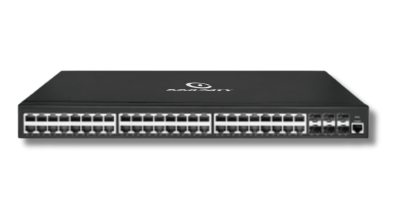
Provision zero-touch, monitor ports and routing in real time, and push config across every site, all from a single pane of glass.
High-performance managed switching with efficient traffic segmentation.
Inter-VLAN and static routing in a single device.
802.1X, ARP and DoS protection built in.
High-speed SFP/SFP+ uplinks to core and aggregation.
Port monitoring and analytics via NetCloud Central.
Optimized power without compromising performance.
Key specifications from the NetForce L3 series. ↓ Download datasheet (PDF)
| Layer | Layer 3 managed switch |
|---|---|
| Access ports | 48 × Gigabit RJ45 |
| Uplinks | 6 × 10G SFP+ |
| Routing | Inter-VLAN & static routing |
| Resiliency | STP/RSTP/MSTP, ERPS ring |
| Security | 802.1X, ARP, IP, DoS protection |
|---|---|
| Traffic | VLAN, QoS, ACL, multicast |
| Management | NetCloud, Web, CLI, Telnet, SSH, SNMP |
| Mounting | 19-inch rack |
| Make | Make in India OEM; MTCTE, CE, FCC, RoHS |
The L3-D486 routes between VLANs across 48 Gigabit RJ45 ports and uplinks over 6 × 10G SFP+, so one switch can act as both access and distribution.
Each department can sit in its own VLAN, routed in the switch rather than at a distant core. That cuts load on the uplinks.
A smaller campus can use the six 10G SFP+ ports for building links and the 48 copper ports for local services. ERPS ring support adds a redundant path between buildings.
48 wired seats fit on one switch, with 802.1X and ARP/IP protection limiting what each machine can reach. Multicast helps when a trainer streams to every screen.
Choosing between models? If the floor also needs PoE, the NetForce L3-E486 keeps the 48 plus 6 × 10G layout and adds PoE+ with a 460W budget. If routing is not needed, the NetForce L2 D486 offers 48 ports with 4 × SFP/SFP+ uplinks.
Tell us your port count and topology, and our India engineers will size and quote the right configuration.
Deployments where this stack already runs, with the environment, the equipment and what changed.
Passenger Wi-Fi across six international terminals, run from one NetCloud console.
Read case study →Public WiFiPublic hotspots with app sign-in, vouchers, PDO settlement and central IPDR.
Read case study →HealthcareBranded guest Wi-Fi kept apart from clinical and admin systems.
Read case study →Tell us about your sites and users. Our India-based engineers will recommend the right stack and send across datasheets and pricing, usually within one business day.